If you use several apps for your business, you probably spend a lot of time moving information from one place to another. You may copy data from a form into a spreadsheet, send notifications manually, update a CRM, or create tasks whenever a new customer signs up.
That is where
Make comes in.
Make is a visual automation platform that lets you connect apps, build automated workflows, and manage repetitive processes without having to write everything from scratch. The platform supports more than 3,000 pre-built app integrations and also includes AI-powered automation tools.
In this guide, we will look at what
Make is, how it works, its main features, pricing, pros and cons, and who can benefit from using it.

What Is Make?
Make is a visual automation and integration platform designed to help businesses connect their apps and automate repetitive tasks.
Instead of manually moving information between different tools, you can create a workflow that does the work automatically.
For example, you could create a
Make workflow that works like this:
New customer fills out a form → Customer information goes to a CRM → A welcome email is sent → A task is created for the sales team.
The platform uses a visual builder, so you can see how information moves from one application to another.
Make describes its platform as visual, flexible, and scalable, with support for both traditional automation and AI-powered workflows.
How Does Make Work?
The basic idea behind
Make is simple: you create a scenario that tells your connected apps what should happen and when it should happen.
A typical workflow has three main parts:
1. Trigger
The trigger is the event that starts your automation.
For example:
- A new form is submitted
- A new email arrives
- A customer is added
- A payment is received
- A new spreadsheet row is created
2. Actions
After the trigger happens,
Make performs one or more actions.
For example, it could:
- Add information to Google Sheets
- Send an email
- Create a CRM contact
- Send a Slack notification
- Create a task
- Update a database
3. Logic and Conditions
You can also add filters, routers, and different paths to make your workflows more flexible.
For example, you could tell
Make:
If a customer spends more than a certain amount → send the information to the sales team.
If the customer spends less → add them to a regular email sequence.
This visual approach makes it possible to build more detailed workflows without manually handling every step.
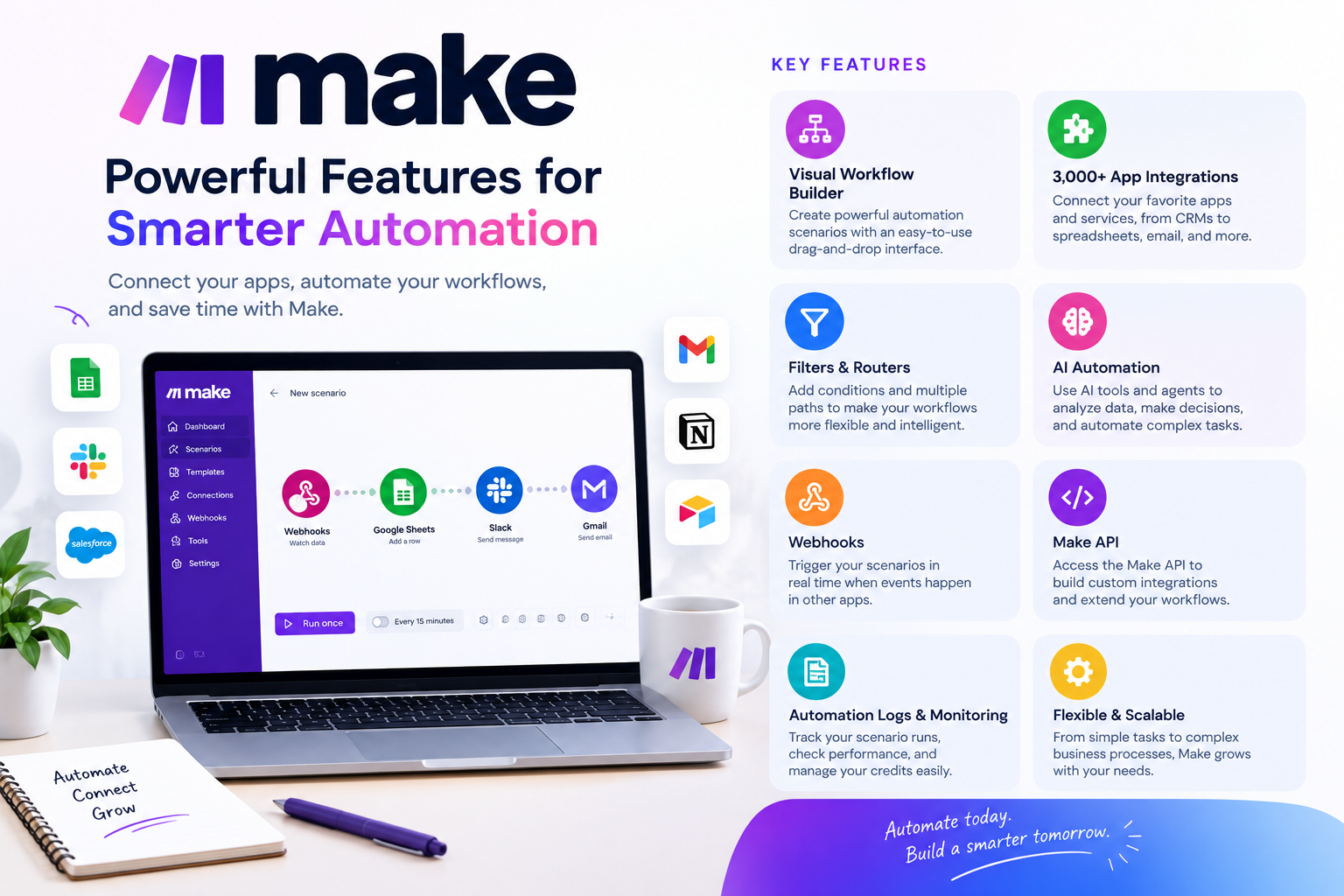
Key Features of Make
Make offers several features designed to help businesses automate workflows and connect their software.
Visual Workflow Builder
One of the main features of
Make is its visual workflow builder.
You can drag and connect modules on a visual canvas to create automation scenarios. This gives you a clear view of how information moves through your workflow.
The visual approach can be particularly useful when you are working with workflows that contain several steps or different branches.
Thousands of App Integrations
Make supports more than 3,000 pre-built applications.
These integrations allow you to connect popular business tools and create workflows between them.
Examples include tools for:
- CRM
- Email marketing
- Spreadsheets
- Project management
- Communication
- Forms
- Databases
- AI
- E-commerce
This means you can build workflows around the software your business already uses instead of replacing everything with one platform.
Filters and Routers
Filters allow you to control which information continues through a workflow.
Routers allow you to create different paths within the same scenario.
For example, an incoming lead could be sent down different paths depending on its location, lead type, purchase value, or another condition.
This gives
Make more flexibility than a simple one-trigger-one-action automation.
AI Automation
AI is now an important part of
Make.
The platform supports AI-powered workflows and AI agents that can work with business processes.
Make says its AI agents can make decisions based on goals, prompts, and available data.
You can use AI automation for tasks such as:
- Classifying information
- Processing customer requests
- Handling unstructured data
- Routing leads
- Summarizing information
- Automating decisions
- Connecting AI tools to existing workflows
Make also offers Maia, an AI assistant designed to help users build automations using natural language.
Webhooks
Webhooks can allow your automation to react when information is received from another application or service.
This can be useful when you want an automation to start immediately after an event happens instead of waiting for a scheduled check.
Make API
Paid
Make plans include access to the Make API, allowing developers and businesses to work with the platform programmatically.
This can be useful when you want to connect
Make to a custom system or build more advanced integrations.
Automation Logs and Monitoring
When you build multiple automations, it is important to know what happened during each run.
Make provides visibility into scenario execution and credit usage, helping you monitor your workflows and identify problems when an automation does not behave as expected.
How to Use Make
Getting started with
Make does not require you to build a complicated automation immediately.
A simple process looks like this:
Create an Account → Choose an App → Create a Scenario → Add a Trigger → Add Actions → Test the Workflow → Turn It On
Start with one repetitive task that you regularly perform manually.
For example, if you manually copy new leads from a form into a spreadsheet, automate that process first.
Once you understand how scenarios work, you can create more advanced workflows with filters, routers, multiple applications, and AI.
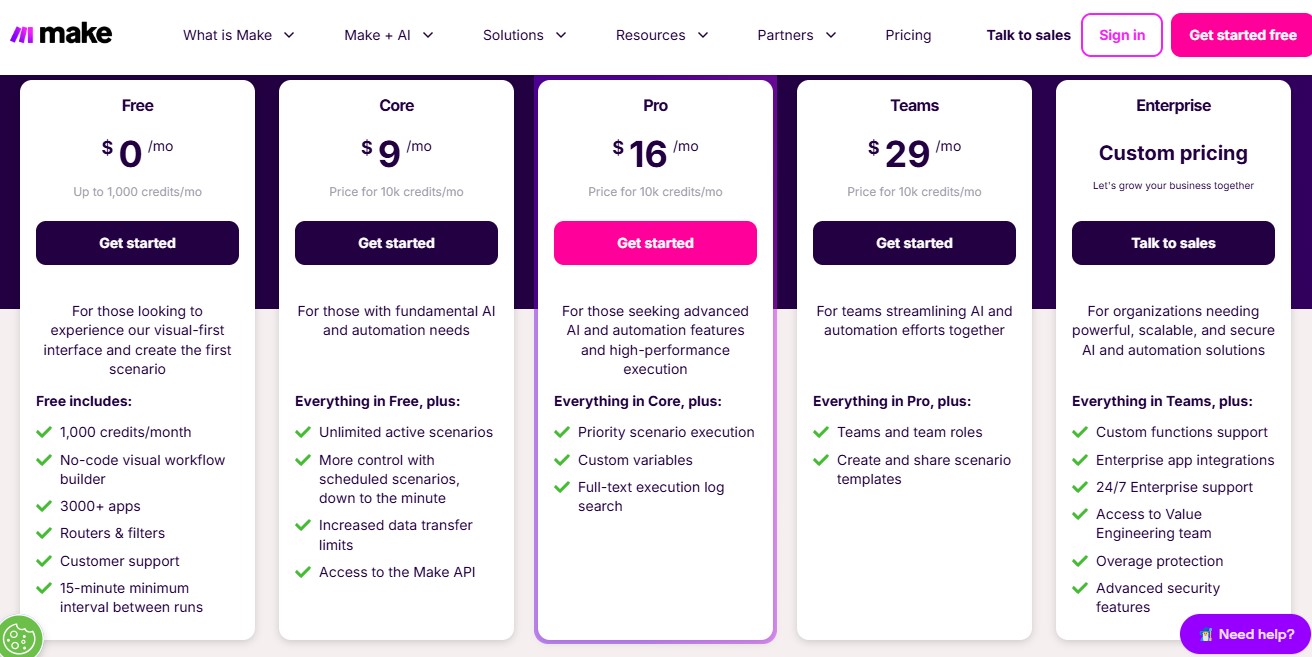
Make Pricing: How Much Does Make Cost?
Make uses a credit-based pricing system. The number of credits you need depends on how your automations are used. The current pricing page lists plans based on monthly credit allowances.
| Plan |
Starting Price |
Credits |
Best For |
| Free |
$0/month |
Up to 1,000/month |
Trying automation |
| Core |
$12/month |
10,000/month |
Basic automation |
| Pro |
$21/month |
10,000/month |
Advanced automation |
| Teams |
$38/month |
10,000/month |
Teams and collaboration |
| Enterprise |
Custom |
Custom |
Larger organizations |
The prices above are the current displayed prices for the 10,000-credit monthly tier on
Make's pricing page; annual billing can provide savings, and pricing varies with credit volume.
Free Plan
The Free plan costs $0 and includes up to 1,000 credits per month.
It also provides the visual workflow builder, thousands of app integrations, routers and filters, and a 15-minute minimum interval between scheduled runs.
This can be useful if you are learning how automation works or only need a small number of automated tasks.
Core Plan
The Core plan starts at $12 per month for 10,000 credits.
It adds features such as unlimited active scenarios, more flexible scheduling, increased data transfer limits, and access to the Make API.
Pro Plan
The Pro plan starts at $21 per month for 10,000 credits.
It includes the Core features plus tools such as priority scenario execution, custom variables, and full-text execution log search.
Teams Plan
The Teams plan starts at $38 per month for 10,000 credits.
It adds team-focused features such as team roles and the ability to create and share scenario templates.
Enterprise Plan
The Enterprise plan uses custom pricing.
It is designed for organizations that need larger-scale automation, advanced security, enterprise integrations, support, and other features for complex environments.
Who Should Use Make?
Make can be useful for different types of users.
Small Businesses
Small businesses can use
Make to automate repetitive administrative tasks without needing to hire a developer for every workflow.
Marketing Teams
Marketing teams can connect forms, CRM systems, email platforms, advertising tools, and other applications to reduce manual work.
Sales Teams
Sales teams can automate lead management, notifications, customer updates, and follow-up tasks.
Agencies
Agencies managing multiple clients can use
Make to create repeatable workflows and reduce time spent performing the same manual tasks.
Operations Teams
Operations teams can use
Make to connect different systems and automate processes that involve multiple applications.
Pros and Cons of Make
Pros
- Visual workflow builder
- More than 3,000 app integrations
- Flexible automation scenarios
- Filters and routers
- AI automation features
- Free plan available
- API access on paid plans
- Suitable for simple and advanced workflows
Cons
- Complex scenarios can take time to learn
- Credit usage needs to be monitored
- Advanced workflows can become difficult to manage
- Pricing becomes more dependent on usage as automation grows
Is Make Easy to Use?
For simple automations,
Make can be relatively straightforward because its visual interface lets you see how each step connects.
However, more complicated scenarios can require some learning.
Once you start adding multiple branches, filters, conditions, APIs, and AI tools, the workflow can become more technical.
The good thing is that you can start small and gradually build more advanced automations as you become comfortable with the platform.
Make vs Other Automation Platforms
Make is one of several platforms designed to connect applications and automate business processes.
Compared with simpler automation tools,
Make puts a strong focus on visual workflow design and more flexible scenarios.
Its visual canvas can be useful when you want to see multiple steps and branches in one place.
The right platform depends on factors such as the apps you use, workflow complexity, automation volume, budget, and how much control you want over your processes.
Rather than choosing a platform based only on the number of integrations, it is worth testing whether it works well with the applications and workflows your business actually needs.
Is Make Worth Using?
Whether
Make is worth using depends on how much repetitive work you have and how complex your workflows are.
If you regularly move information between several applications, send repetitive notifications, update records, or perform the same administrative tasks, automation can save time.
Make is particularly useful when you want more control over how your workflows operate.
The Free plan also gives beginners a way to experiment before paying for a subscription.
Final Thoughts
Make is a flexible automation platform for businesses that want to connect their applications and reduce repetitive work.
Its visual builder makes it possible to see how workflows operate, while features such as filters, routers, webhooks, API access, and AI automation allow you to build more advanced processes.
The pricing structure is based on credits, so understanding your expected automation volume is important before choosing a paid plan.
If you are new to automation, start with a simple workflow and learn the platform gradually. As your needs grow, you can build more complex scenarios and connect more of the tools your business already uses.
Frequently Asked Questions About Make
What is Make used for?
Make is used to connect applications and automate repetitive business processes. You can use it to move information between apps, trigger actions, send notifications, update records, and build AI-powered workflows.
Is Make free?
Yes.
Make has a Free plan that costs $0 per month and includes up to 1,000 credits per month.
How much does Make cost?
The current displayed pricing starts at $0 for Free, $12/month for Core, $21/month for Pro, and $38/month for Teams at the 10,000-credit monthly tier. Enterprise pricing is custom.
Does Make use AI?
Yes.
Make includes AI automation features and AI agents, and its platform supports connections to AI applications and models.
How many apps can Make connect?
Make currently advertises more than 3,000 pre-built app integrations.
Ready to Automate Your Workflows?
If you spend too much time moving information between apps or repeating the same business tasks,
Make can help you turn those processes into automated workflows.
Start with one repetitive task, connect the apps involved, and build your first scenario.
Explore Make today and see how automation can simplify your everyday work.
Get Started With Make