Writing can be harder than it looks.
Sometimes you know exactly what you want to say, but the words do not come out the way you want. Other times, you may have a long piece of writing that needs to be shortened, corrected, rewritten, or made easier to understand.
This is where
QuillBot can help.
QuillBot is an AI-powered writing platform with tools for paraphrasing, grammar checking, summarizing, translation, plagiarism checking, AI detection, writing assistance, and more. The platform has also expanded beyond its original writing focus to include tools for AI chat, image creation, presentations, and other creative tasks.
In this guide, we’ll explain what
QuillBot is, how it works, its main features, pricing, pros and cons, and who may benefit from using it.
What Is QuillBot?
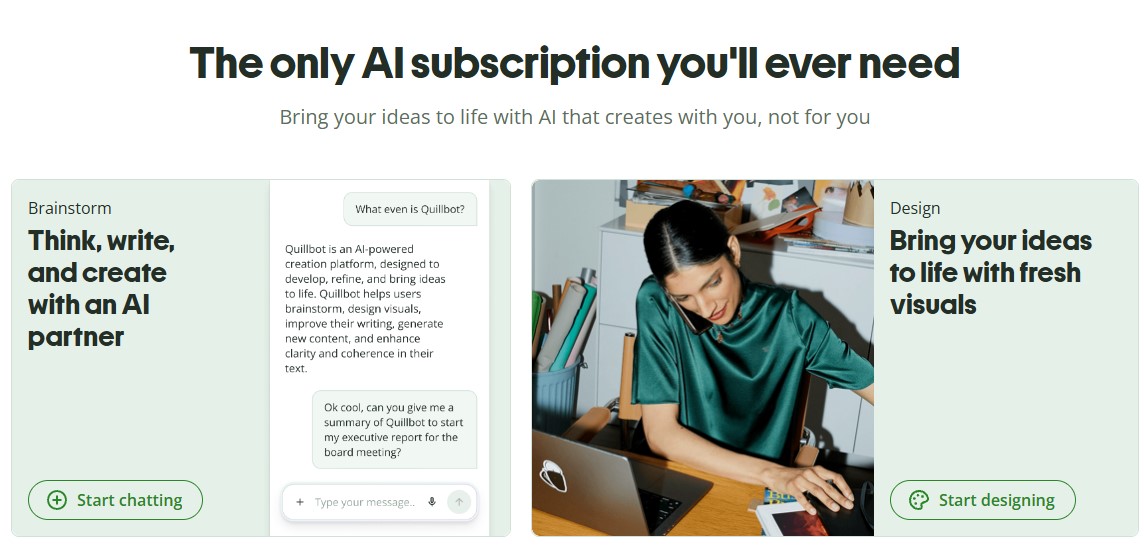
QuillBot is an AI writing and productivity platform designed to help users improve, rewrite, summarize, and create content.
It can be useful when you want to make a sentence clearer, change the tone of a paragraph, shorten a long document, check grammar, or find another way to express an idea.
For example, instead of rewriting an entire paragraph yourself, you can enter it into the
QuillBot Paraphraser and choose an appropriate writing style.
The platform is used by students, professionals, writers, businesses, and other people who want help with everyday writing tasks.
How Does QuillBot Work?
QuillBot uses AI to analyze the text you provide and suggest changes based on the tool you are using.
For example, if you use the Paraphraser,
QuillBot analyzes your text and generates a rewritten version while attempting to preserve the original meaning.
If you use the Grammar Checker, it looks for grammar, spelling, and punctuation problems and suggests improvements.
The process is generally simple:
Enter your text → Choose a tool → Review the result → Edit and use the improved version
The important thing to remember is that AI-generated suggestions should still be reviewed by the user. The tool can help with writing, but you should make sure the final version accurately represents what you want to say.
What Is the QuillBot Paraphraser?
The Paraphraser is one of the best-known tools on
QuillBot.
It helps you rewrite sentences and paragraphs while keeping the main meaning of the original text.
You can use it when you want to:
- Improve sentence structure
- Make writing clearer
- Change the tone
- Find alternative wording
- Reduce repetitive language
- Make a paragraph more concise
The free version currently allows paraphrasing up to 125 words at a time, while Premium provides unlimited paraphrasing and access to additional modes.
Key Features of QuillBot
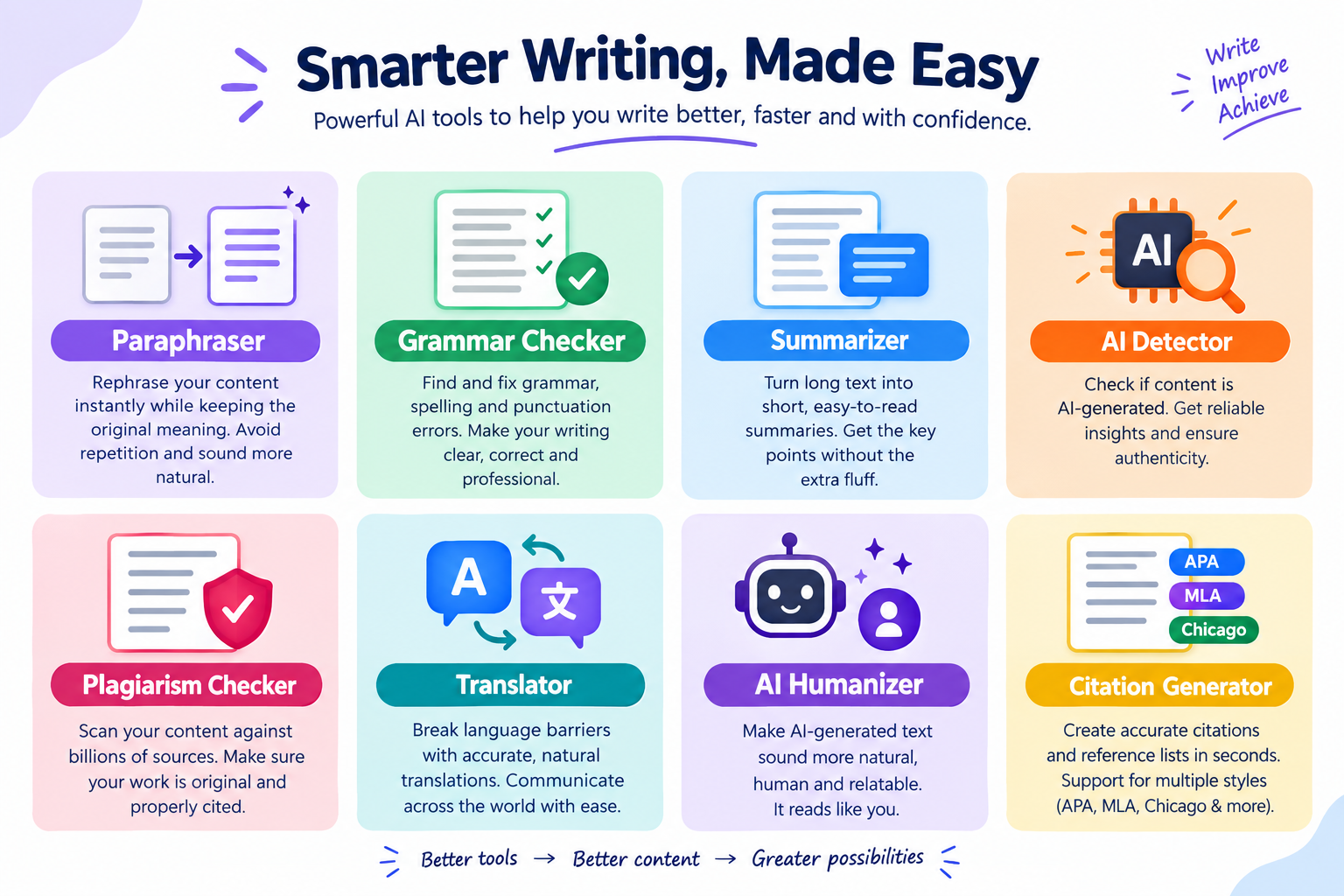
QuillBot offers more than just a paraphrasing tool. Its current platform includes several writing, research, productivity, and AI features.
Here are some of the main ones.
1. Paraphraser
The Paraphraser helps you rewrite existing text without manually changing every sentence.
You can use different modes to adjust how the rewritten text sounds.
Free users have access to Standard and Fluency modes, while Premium users get access to additional modes and more advanced controls.
2. Grammar Checker
The Grammar Checker helps identify common writing problems involving grammar, spelling, and punctuation.
It can also provide suggestions that improve sentence clarity.
Premium users get additional recommendations, including suggestions for passive voice, repetitive wording, clarity, and conciseness.
3. Summarizer
Reading a long document can take a lot of time.
The
QuillBot Summarizer can help reduce longer text into shorter summaries that focus on the main points.
This can be useful when working with articles, reports, research material, or other lengthy documents.
Free accounts currently support summaries of up to 1,200 words, while Premium increases the limit to up to 6,000 words.
4. AI Detector
The AI Detector is designed to analyze text and provide an assessment of whether the writing may have been generated or refined by AI.
This can be useful when reviewing content, but AI detection tools should not be treated as absolute proof of how a piece of writing was created.
QuillBot provides limited AI detection access on its Free plan and expanded access with Premium.
5. Plagiarism Checker
The Plagiarism Checker helps users identify similarities between their writing and other sources.
It is particularly useful for students, researchers, writers, and professionals who want to check their work before submitting or publishing it.
The feature is currently available with Premium rather than the Free plan, with Premium allowing up to 25,000 words per month for plagiarism checks.
6. Translator
QuillBot also includes a translation tool that can help users translate text between multiple languages.
This can be useful for people working with international content, multilingual documents, or communication in different languages.
The current platform supports translation across more than 40 languages, with usage limits depending on the plan.
7. AI Humanizer
The AI Humanizer is designed to rewrite AI-generated text so it reads more naturally.
It can be useful when you want to improve the flow, tone, or readability of AI-assisted writing.
However, it is still important to review the output yourself rather than assuming that every rewritten sentence is automatically accurate or appropriate for your audience.
8. AI Chat
QuillBot also offers AI Chat, which lets users interact with an AI assistant through a conversational interface.
You can use it to brainstorm ideas, ask questions, generate content, and get help with different writing tasks.
Free users currently receive a limited number of AI Chat queries per day, while Premium users get unlimited access.
9. Citation Generator
If you work on academic or research-based content, the Citation Generator can be useful for creating citations in different styles.
QuillBot says its Citation Generator supports more than 1,000 citation styles, including popular formats such as APA, MLA, and Chicago.
10. AI Image and Presentation Tools
QuillBot has expanded beyond traditional writing tools.
Its current platform includes AI image generation and presentation-generation features. Free users receive limited access, while Premium users receive higher usage limits.
This makes
QuillBot more of an all-in-one AI productivity platform than simply a paraphrasing tool.
How to Use QuillBot
Getting started with
QuillBot is straightforward.
Step 1: Open QuillBot
Visit the official
QuillBot website and choose the tool you want to use.
Step 2: Enter Your Text
Paste your text into the appropriate editor.
For example, you can paste a paragraph into the Paraphraser if you want to rewrite it.
Step 3: Choose Your Settings
Depending on the tool, you may be able to select a mode, tone, or other writing preferences.
Step 4: Generate the Result
Let
QuillBot process the text and provide its suggestions.
Step 5: Review and Edit
Read through the result carefully.
Make any changes needed to ensure the writing sounds natural and that the meaning has not changed.
QuillBot Pricing: How Much Does It Cost?
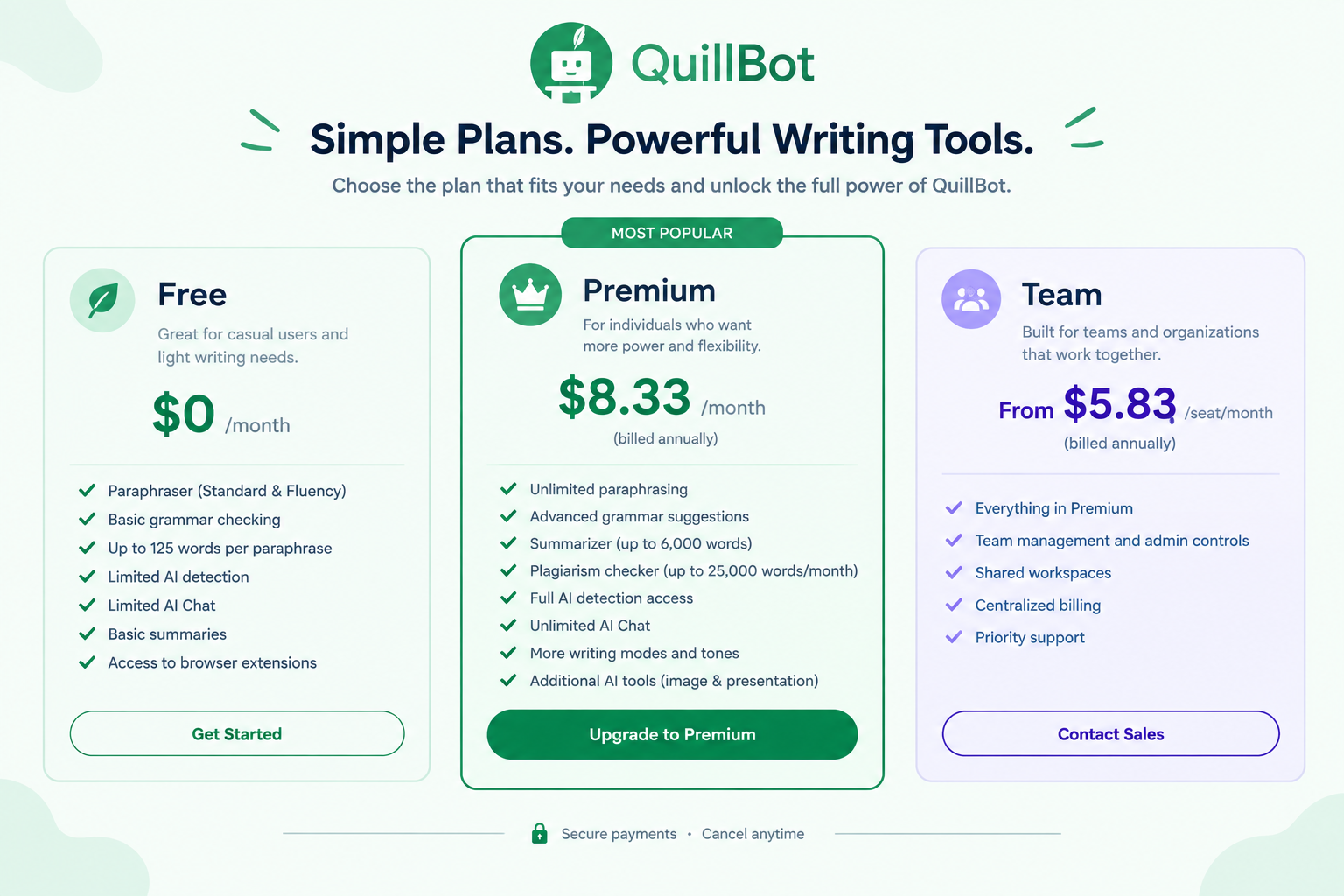
QuillBot offers both Free and Premium options, with additional plans for teams.
The official Premium page currently lists the following:
| Plan |
Price |
Main Use |
| Free |
$0/month |
Basic writing and AI tools |
| Premium |
$8.33/month when billed annually |
Full individual access |
| Team |
From $5.83/seat/month when billed annually |
Organizations and teams |
The Premium annual plan is currently listed at $8.33 per month, billed annually.
QuillBot also lists monthly and quarterly billing options, and its official help center notes that pricing can vary by region and currency at checkout.
The monthly Premium price is currently listed at $19.95, while the quarterly option is listed at $13.31 per month when billed for three months.
Team pricing depends on the number of seats. The current official team page lists annual pricing from $7.50 per seat per month for 2–10 seats, $6.66 for 11–50 seats, and $5.83 for 51+ seats.
Because pricing can change and may vary by location, check the official
QuillBot pricing page before subscribing.
Free vs. Premium QuillBot
The Free plan is useful if you only need basic writing assistance.
It currently includes:
- Standard and Fluency paraphrasing
- Up to 125 words per paraphrase
- Basic grammar checking
- Limited AI detection
- Limited AI Chat
- Basic summaries
- Limited AI image generation
- Access to browser extensions
Premium removes many of these limits and adds features such as unlimited paraphrasing, advanced writing suggestions, plagiarism checking, unlimited AI Chat, and additional AI tools.
 Who Should Use QuillBot?
QuillBot can be useful for different types of users.
Students
Students can use it to improve sentence structure, check grammar, summarize reading material, and create citations.
However, students should always follow their school's or institution's rules regarding AI-assisted writing.
Bloggers and Content Writers
Bloggers can use
QuillBot to rewrite sentences, improve readability, find alternative wording, and polish drafts.
It can be especially useful during the editing stage.
Business Professionals
Professionals can use
QuillBot to improve emails, reports, proposals, presentations, and other business communication.
Freelancers
Freelancers who create content for clients can use the platform to edit and refine drafts more efficiently.
Researchers
Researchers can use tools such as the Summarizer, Citation Generator, Grammar Checker, and Plagiarism Checker as part of their writing workflow.
Pros and Cons of QuillBot
Pros
- Easy to use
- Offers a useful Free plan
- Strong paraphrasing capabilities
- Includes grammar checking
- Includes summarization tools
- Offers plagiarism checking with Premium
- Includes AI detection
- Supports translation
- Offers AI Chat
- Available across different platforms and extensions
- Includes additional AI creation tools
Cons
- Free features have usage limits
- Some useful features require Premium
- AI-generated suggestions still need human review
- Pricing varies depending on the billing period and region
- Some advanced tools may not be necessary for casual users
Is QuillBot Easy to Use?
One of the main advantages of
QuillBot is its simple interface.
You generally do not need technical knowledge to use the basic tools.
You paste your text, choose the tool you need, review the result, and make your final edits.
The platform becomes more complex when you start using its wider collection of AI tools, but most individual tools are still relatively straightforward.
Is QuillBot Good for SEO Content?
QuillBot can be useful during the editing stage of SEO content.
For example, you can use it to:
- Improve sentence clarity
- Reduce repetitive wording
- Rewrite awkward sentences
- Improve readability
- Check grammar
- Create shorter summaries
- Adjust the tone of a draft
However,
QuillBot should not replace proper SEO research.
You still need to conduct keyword research, understand search intent, create useful content, verify facts, organize headings properly, and make sure the article genuinely helps readers.
Is QuillBot Worth It?
Whether
QuillBot is worth paying for depends on how often you use its advanced features.
If you only need occasional paraphrasing or basic grammar corrections, the Free plan may be enough.
If you regularly write long documents, need unlimited paraphrasing, want advanced grammar suggestions, or need access to plagiarism checking and other Premium features, the paid plan may be more useful.
A good approach is to start with the Free plan and see which features you actually use before upgrading.
Final Thoughts
QuillBot has grown from a simple paraphrasing tool into a broader AI-powered writing and productivity platform.
Its tools can help with paraphrasing, grammar, summarization, translation, plagiarism checking, AI detection, brainstorming, and other writing tasks.
The Free plan gives users a way to try the platform without paying, while Premium provides higher limits and access to additional features.
For students, bloggers, professionals, researchers, and content creators,
QuillBot can be a useful part of the writing process.
Just remember that AI should support your writing rather than completely replace your own judgment. Always review the final result, check important facts, and make sure the finished content sounds like you.
Frequently Asked Questions About QuillBot
What is QuillBot used for?
QuillBot is used to paraphrase, edit, summarize, translate, and improve written content. It also offers AI detection, plagiarism checking, AI Chat, and other AI-powered tools.
Is QuillBot free?
Yes.
QuillBot offers a Free plan with limited access to many of its tools. Premium provides higher limits and additional features.
How much does QuillBot Premium cost?
The current official annual Premium price is $8.33 per month when billed annually. Monthly and quarterly options are also available, and prices may vary by region.
Can QuillBot check plagiarism?
Yes.
QuillBot has a Plagiarism Checker, but it is currently a Premium feature rather than part of the Free plan.
Can QuillBot detect AI writing?
Yes.
QuillBot includes an AI Detector. Free users receive limited access, while Premium provides expanded access.
Is QuillBot good for students?
QuillBot can help students with grammar, paraphrasing, summarization, citations, and other writing tasks. Students should still follow their school's or institution's rules about using AI tools.
Ready to Improve Your Writing?
If you want a simple way to rewrite sentences, check grammar, summarize content, and improve your writing,
QuillBot gives you several tools in one platform.
You can start with the Free plan and explore the tools before deciding whether you need Premium.
Get started with QuillBot and see which writing tools fit your workflow.
Get Started With QuillBot