If you use several apps for your business, you probably spend more time than you would like moving information from one tool to another.
For example, you may receive a new lead through a form, add that lead to your CRM, send a notification to your sales team, and then create a follow-up task. Doing all of that manually can become repetitive very quickly.
This is where
Zapier comes in.
Zapier is an automation platform that connects the apps you already use and allows them to work together automatically. Instead of repeatedly performing the same tasks yourself, you can create automated workflows that handle them for you.
In this guide, we'll look at what
Zapier is, how it works, its main features, pricing, pros and cons, and who should consider using it.

What Is Zapier?
Zapier is a no-code automation platform that connects apps, data, and business processes so repetitive tasks can happen automatically.
The basic idea is simple: when something happens in one application,
Zapier can automatically perform an action in another application.
For example:
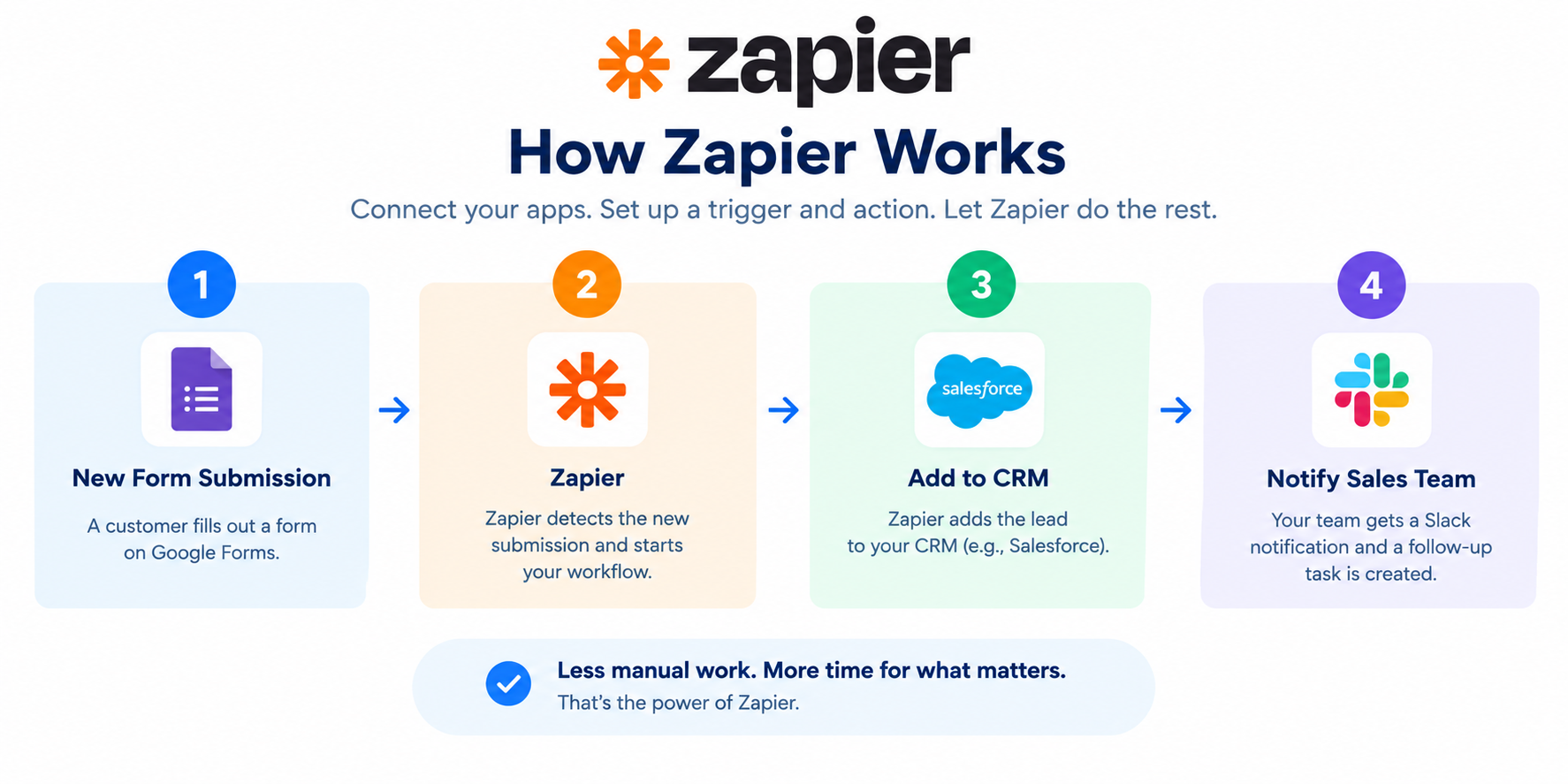
- A customer fills out a form.
- Zapier adds the information to your CRM.
- Your sales team receives a notification.
- A follow-up task is created automatically.
These automated workflows are called
Zaps.
According to
Zapier, its platform now connects with more than 9,000 apps, giving businesses a wide range of options for connecting their existing tools.
How Does Zapier Work?
The main idea behind
Zapier is the trigger-and-action system.
A trigger is the event that starts your automation. An action is what
Zapier does after the trigger happens.
For example, imagine you run an online business and use Google Sheets to keep track of new customers.
You could create a workflow like this:
New customer added → Add customer to Google Sheets → Send notification → Create follow-up task
Once the workflow is published,
Zapier can handle those steps automatically whenever the trigger occurs.
You don't need to manually copy and paste information between your apps.
What Is a Zap?
A
Zap is an automated workflow created in
Zapier.
Every Zap has at least one trigger and one action. More advanced workflows can contain multiple actions and other logic.
For example:
Trigger: A new lead submits a form.
Action 1: Add the lead to your CRM.
Action 2: Send a notification to your sales team.
Action 3: Create a follow-up task.
Action 4: Send an email to the lead.
This allows one event to start several automated tasks.
Key Features of Zapier
Zapier has grown beyond simple app-to-app automation. Its current platform includes workflows, Tables, Forms, AI features, MCP, and other tools designed to help businesses automate more of their processes.
Here are some of its main features.
1. Automated Workflows
The main feature of
Zapier is its ability to create automated workflows between different applications.
You can connect apps and decide what should happen when a specific event occurs.
For example, a business could create a workflow that automatically sends a Slack notification whenever a new customer is added to its CRM.
This is useful for sales, marketing, customer support, administration, and many other business processes.
2. Multi-Step Zaps
Simple automation may only need one trigger and one action.
However, many business processes require several steps.
With multi-step workflows,
Zapier can perform multiple actions after a single trigger.
For example:
New order → Add customer → Update spreadsheet → Send email → Notify team
This can help reduce the amount of manual work involved in repetitive processes.
3. Thousands of App Integrations
One of the biggest reasons businesses use
Zapier is its large app ecosystem.
Zapier currently supports more than 9,000 apps, allowing users to connect many of the tools they already use.
Popular categories include:
- CRM software
- Email marketing tools
- Accounting software
- Project management platforms
- Forms
- Spreadsheets
- Communication tools
- Payment platforms
- AI tools
- Customer support software
This makes
Zapier useful even if your business uses several different software platforms.
4. Filters and Paths
Not every automation should run in exactly the same way.
Zapier lets you add logic to your workflows using features such as filters and paths.
A filter can make sure a workflow continues only when certain conditions are met.
Paths can allow different actions depending on the information received.
For example, you could create a workflow where:
High-value lead → Notify sales manager
while:
Regular lead → Add to normal sales queue
This gives you more control over how your automations work.
5. Webhooks
Webhooks allow
Zapier to communicate with applications and services using web requests.
This can be useful when you need to connect a service that doesn't work exactly like a standard app integration.
For businesses with more advanced automation needs, webhooks can provide additional flexibility.
6. Zapier Tables
Zapier Tables is a data-storage tool designed to work with automation.
Instead of keeping information in one application and then manually moving it somewhere else, you can store and manage data inside Tables and use that information in your workflows.
For example, a business could use a Table to keep track of leads, customers, orders, or internal processes.
7. Forms
Zapier Forms allows users to create forms that can feed information directly into automated workflows.
For example, you could create a lead form and automatically send each submission to your CRM, email platform, or internal notification system.
This can make lead collection and follow-up much easier.
8. AI Automation
AI is now an important part of
Zapier.
The platform includes AI-powered features that can help with tasks such as summarizing information, classifying data, drafting content, and making decisions within workflows.
Zapier also provides AI-related tools such as Copilot, which can help users create and manage automation using natural-language instructions.
This means you don't always have to manually build every part of a workflow from scratch.
9. Zapier MCP
Zapier MCP allows AI applications to connect with the apps available through your
Zapier account.
This means an AI assistant can potentially take actions in connected applications instead of simply providing information.
For example, an AI assistant could be connected to business tools and use
Zapier to perform actions such as creating records, sending messages, or updating information.
This makes
Zapier increasingly useful for businesses exploring AI-powered workflows.
How to Create a Workflow in Zapier
Creating an automation is relatively straightforward.
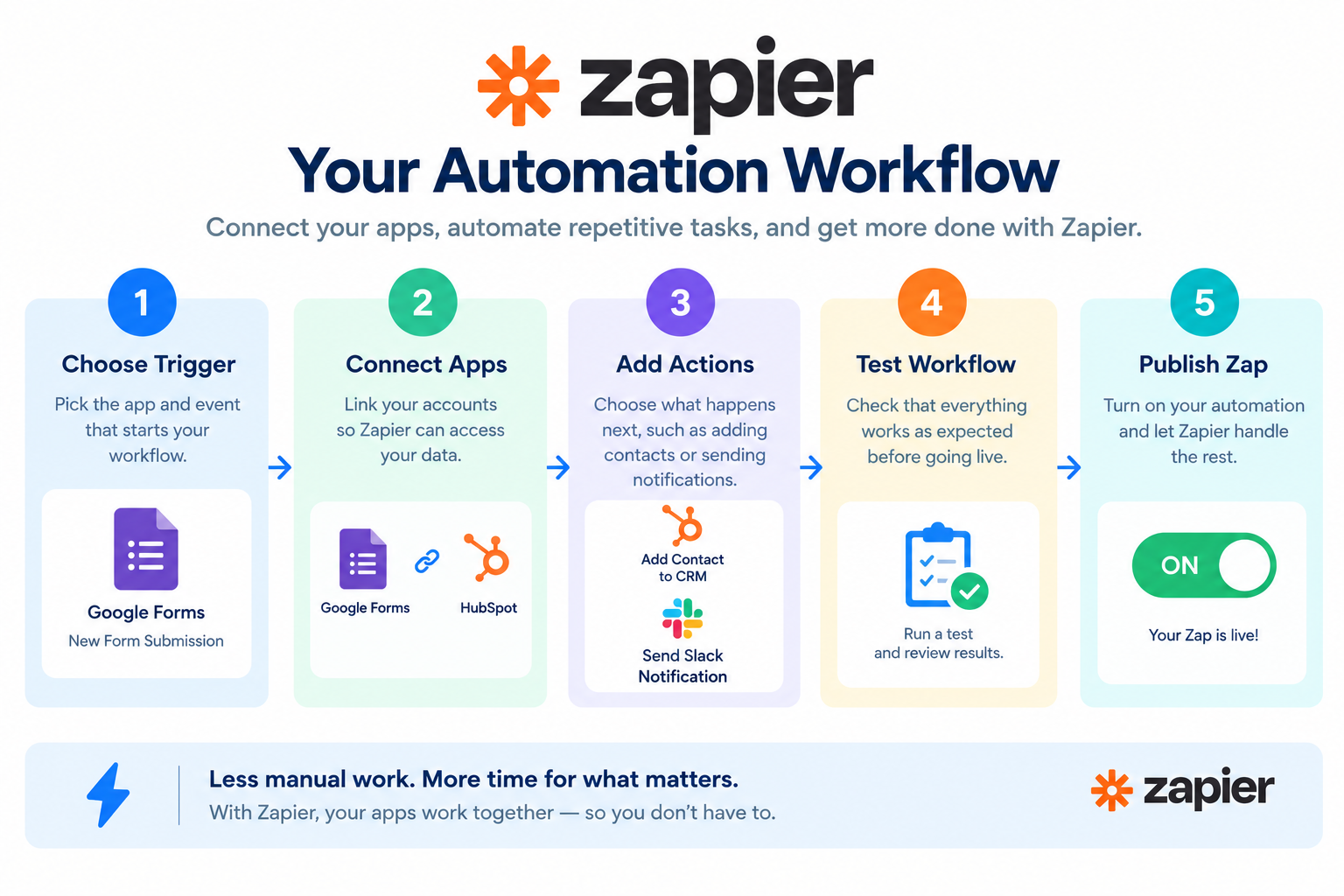
Step 1: Choose Your Trigger
Start by choosing the app and event that should start your automation.
For example:
Google Forms → New Form Response
Step 2: Choose Your Action
Next, choose what should happen when the trigger occurs.
For example:
New Form Response → Create Contact in CRM
Step 3: Connect Your Apps
You'll need to connect the relevant accounts so
Zapier can communicate with your applications.
Step 4: Map Your Information
You can tell
Zapier which information from the trigger should be sent to the action.
For example, you could map a customer's name, email address, phone number, or company name into the appropriate fields.
Step 5: Test the Workflow
Before turning your automation on, test the steps to make sure everything works as expected.
Step 6: Publish Your Zap
Once you're satisfied with the workflow, publish it.
After that,
Zapier can run the automation whenever the trigger occurs.
Zapier Pricing: How Much Does It Cost?
Zapier offers several plans designed for individuals, teams, and larger organizations.
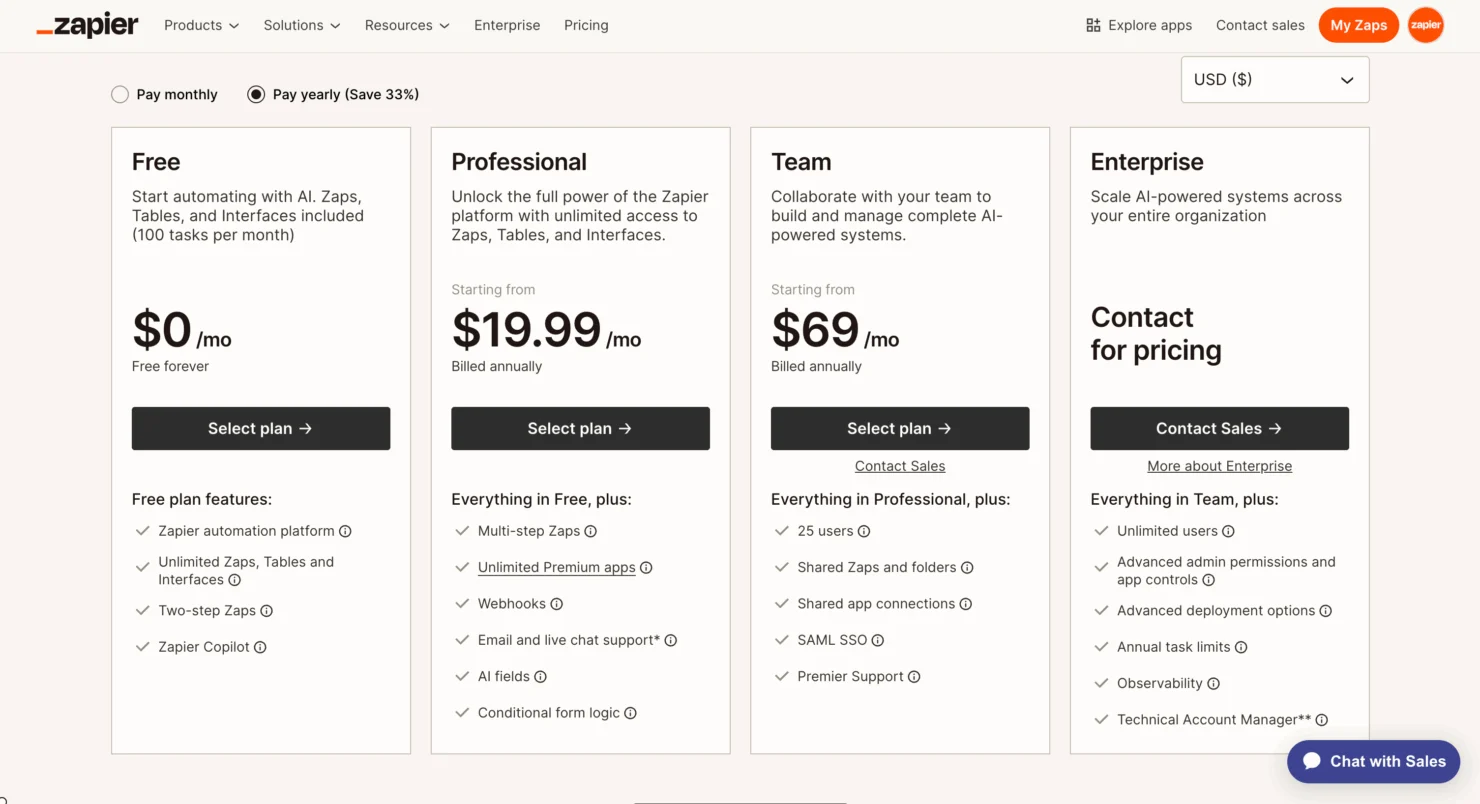
According to the current official pricing page, the main
Zapier plans are:
| Plan |
Starting Price |
Best For |
| Free |
$0/month |
Beginners and simple automation |
| Professional |
From $19.99/month |
Individuals with more advanced needs |
| Team |
From $69/month |
Teams working together |
| Enterprise |
Contact sales |
Larger organizations |
The prices above are in USD and can vary depending on the selected task volume and billing option.
The Free plan includes 100 tasks per month and supports basic automation.
The Professional plan starts at $19.99 per month and adds features such as multi-step workflows, unlimited premium apps, webhooks, and other advanced capabilities.
The Team plan starts at $69 per month and is designed for collaboration, with features such as shared workflows, shared app connections, and support for up to 25 users.
Enterprise pricing is customized for organizations that need more advanced administration, security, support, and deployment options.
Annual billing can reduce the monthly cost, with
Zapier currently advertising savings of up to 33% on its pricing page.
Because
Zapier pricing and task usage can change, it is worth checking the official pricing page before choosing a plan.
Is There a Free Trial?
Yes.
New
Zapier accounts are automatically enrolled in a 14-day Pro trial. No payment method is required, and the account does not automatically upgrade to a paid plan when the trial ends.
There is also a permanent Free plan for users who want to continue using basic automation without paying for a subscription.
This gives you a chance to test the platform before deciding whether you need a paid plan.
Who Should Use Zapier?
Zapier can be useful for many different types of users.
Small Businesses
Small businesses can use automation to reduce repetitive administrative work.
For example, you can automate lead collection, customer follow-ups, notifications, and data entry.
Marketing Teams
Marketing teams can connect forms, email marketing platforms, CRMs, spreadsheets, and other tools to reduce manual work.
Sales Teams
Sales teams can automatically move leads between applications, create follow-up tasks, and notify team members when important events happen.
Freelancers
Freelancers can use
Zapier to automate client onboarding, invoices, emails, forms, and project management tasks.
Agencies
Agencies managing multiple clients can use automation to reduce repetitive work and create standardized workflows.
Pros and Cons of Zapier
Pros
- Easy to use without advanced coding knowledge
- Supports more than 9,000 apps
- Large selection of automation possibilities
- Supports multi-step workflows
- Includes filters and paths
- Offers AI-powered automation features
- Useful for individuals and businesses
- Can reduce repetitive manual work
Cons
- Task usage can become expensive as automation volume grows
- Advanced features require paid plans
- Complex workflows may take time to set up correctly
- Pricing can be difficult to understand if you are new to task-based billing
- Some advanced AI features use more tasks depending on the model and tools involved
Is Zapier Easy to Use?
For basic automation,
Zapier is relatively easy to understand.
The trigger-and-action structure makes the basic concept simple: something happens, and
Zapier responds.
The learning curve becomes higher when you start using advanced features such as filters, paths, webhooks, AI steps, or more complicated multi-step workflows.
The good thing is that you don't need to be a professional programmer to get started.
You can begin with a simple workflow and gradually build more advanced automations as you become familiar with the platform.
Zapier vs. Manual Work
The biggest benefit of
Zapier is not simply connecting apps. It is reducing repetitive work.
Imagine manually transferring 100 leads from a form into a CRM every month.
That process may only take a few minutes each time, but those minutes add up.
With automation, the information can move automatically when a new lead arrives.
This gives you more time to focus on tasks that actually require human attention.
Is Zapier Worth Using?
Whether
Zapier is right for you depends on how much repetitive work you do and how many applications you use.
If you regularly copy information between apps, send repetitive notifications, create the same tasks, or perform similar administrative processes, automation can be useful.
The Free plan is a practical way to test basic workflows. Users with higher automation requirements may need a paid plan because task usage and advanced features become more important as workflows grow.
The best approach is to identify the repetitive processes in your business first and then see whether
Zapier can automate them.
Frequently Asked Questions About Zapier
1. What is Zapier used for?
Zapier is used to automate repetitive tasks by connecting different apps and creating workflows that perform actions automatically.
2. Is Zapier free?
Yes.
Zapier has a Free plan with 100 tasks per month. Paid plans are available for users who need more tasks and advanced features.
3. Does Zapier require coding?
No. Basic
Zapier workflows can be created without coding. More advanced users can also use tools such as webhooks, code, and the developer platform when needed.
4. How many apps does Zapier support?
Zapier currently supports more than 9,000 apps, according to its official documentation.
5. What is a Zap?
A Zap is an automated workflow in
Zapier. It normally consists of a trigger that starts the workflow and one or more actions that happen afterward.
6. Does Zapier have a free trial?
Yes. New accounts are automatically enrolled in a 14-day Pro trial, and no payment method is required.
Final Thoughts
Zapier is more than just a tool for connecting two apps.
It has developed into a broader automation platform that combines workflows, data management, forms, AI features, and tools for connecting AI systems with other applications.
Its biggest advantage is the ability to bring different tools together without requiring users to build every integration themselves.
For a small business, freelancer, marketer, sales team, or growing company,
Zapier can help reduce repetitive tasks and create smoother workflows.
If you are new to automation, start small. Choose one repetitive task, build a simple Zap, test it, and then expand from there.
Ready to Automate Your Work?
If you're tired of repeating the same tasks across different apps,
Zapier can help you connect your tools and automate those processes.
Start with a simple workflow, test what works, and build from there.
Get started with Zapier and see how much repetitive work you can automate.
Get Started With Zapier