Running a small business often means wearing several hats at once. You may be responsible for finding clients, completing projects, sending invoices, following up on payments, tracking expenses, and keeping your books organized—all while trying to grow the business.
This is where accounting and invoicing software can make a meaningful difference.
What is FreshBooks used for? FreshBooks is primarily used to manage invoicing, payments, expenses, time tracking, accounting, financial reporting, and other day-to-day financial tasks for freelancers, self-employed professionals, and small businesses. It brings several of these activities together in one online platform, reducing the need to manage financial information across multiple spreadsheets and applications.
But is FreshBooks actually useful for your business, or is it simply another accounting platform competing for your subscription budget?
In this guide, we’ll look at
what FreshBooks is used for, its major features, current pricing plans, who should consider using it, how to get started, and the potential benefits and limitations you should know before signing up.

What Is FreshBooks?
FreshBooks is an online accounting and invoicing platform designed primarily for freelancers, self-employed professionals, and small businesses.
Unlike accounting software that can feel intimidating to someone without an accounting background, FreshBooks puts considerable emphasis on simplifying everyday financial tasks. Its feature set includes invoicing, payments, expense tracking, time tracking, accounting, reports, projects, estimates, proposals, mileage tracking, client management, and more.
The main idea is straightforward: instead of using one application for invoices, another for expenses, spreadsheets for tracking business income, and separate tools for time tracking, you can manage many of these activities through one platform.
That makes FreshBooks particularly relevant to service-based businesses where getting paid, tracking billable work, and maintaining organized financial records are important.
What Is FreshBooks Used For?
So,
what is FreshBooks used for in practical terms?
FreshBooks can be used for several important business and accounting activities.
1. Creating and Sending Professional Invoices
One of the biggest reasons businesses use FreshBooks is invoicing.
You can create professional invoices, customize them with your business information, and send them to clients. FreshBooks also supports automated reminders and recurring invoices, which can reduce the amount of time you spend manually following up on outstanding payments.
For example, a freelance web developer who bills clients monthly can create a recurring invoice rather than rebuilding the same invoice every month.
You can also incorporate tracked time and expenses into invoices, which is particularly useful when clients are billed according to hours worked or expenses incurred.
2. Accepting Client Payments
Sending an invoice is only half the job. You also need to get paid.
FreshBooks provides payment options that can allow clients to pay invoices online. Depending on availability and location, supported payment methods include credit and debit cards, ACH bank transfers, Apple Pay, Google Pay, and Buy Now, Pay Later options.
FreshBooks can also automate parts of the payment process, including reminders and recurring billing.
For a small business owner, that can be valuable because fewer manual payment follow-ups mean more time available for actual client work.
3. Tracking Business Expenses
Another important answer to
what is FreshBooks used for is expense management.
Businesses accumulate expenses constantly—software subscriptions, office supplies, travel, equipment, advertising, transportation, and other operating costs.
FreshBooks allows users to track expenses and organize financial information. Its current feature set also includes receipt scanning, bank imports, and automated expense categorization.
Keeping these expenses organized throughout the year can make it easier to understand where your money is going and prepare financial information when tax time arrives.
4. Tracking Billable Time
If you charge clients by the hour, time tracking can become a surprisingly difficult administrative task.
FreshBooks includes time-tracking tools that allow you to record how much time you spend working on clients and projects. That tracked time can then be used when preparing invoices.
For example, imagine you're a freelance graphic designer who charges $50 per hour.
Instead of trying to remember how many hours you worked at the end of the month, you can track your time as you work. When it's time to invoice the client, those records can be used to create the bill.
This can help reduce underbilling and make your invoices more accurate.
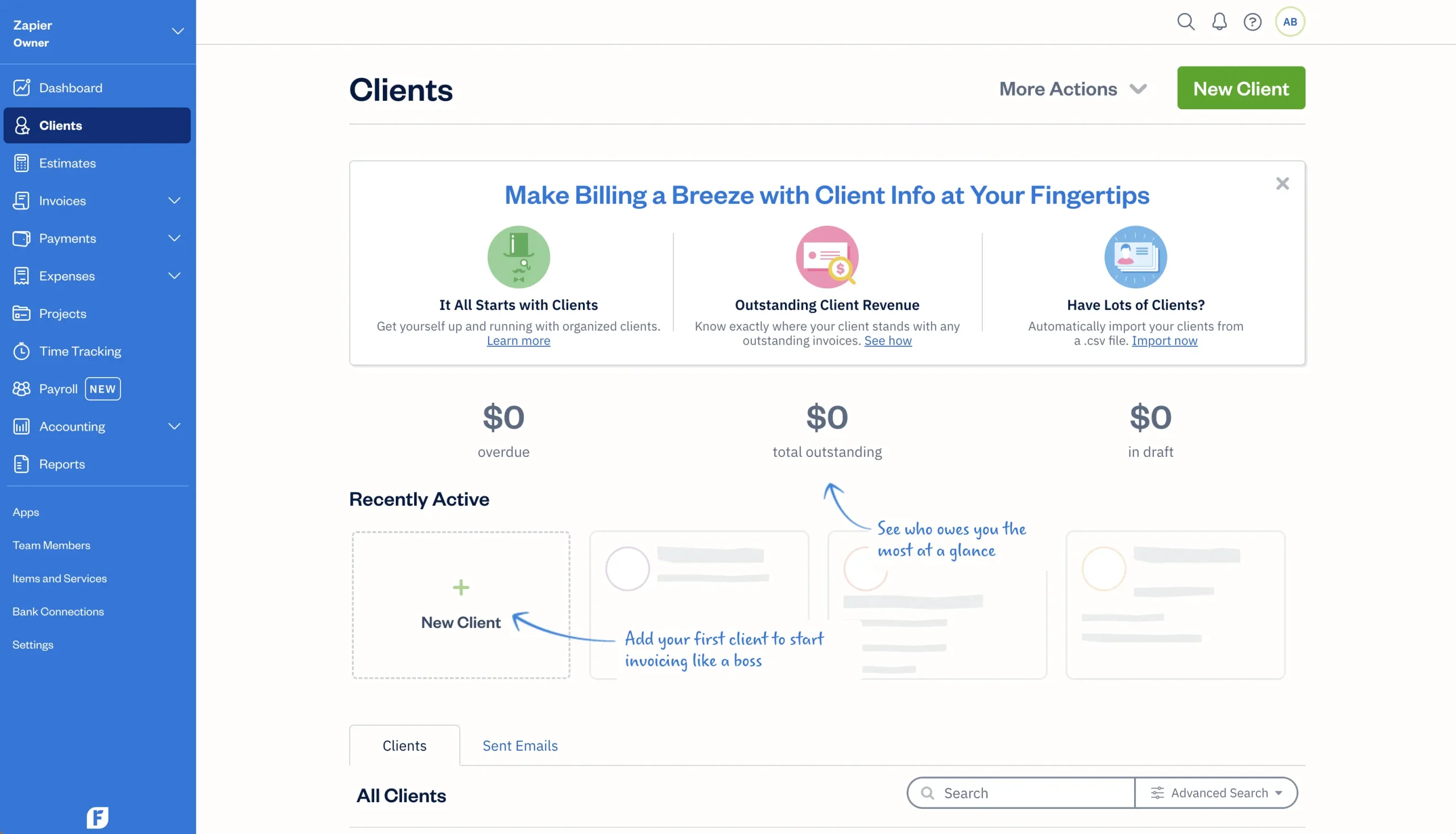
5. Managing Clients and Projects
FreshBooks isn't limited to financial transactions.
You can also manage clients and projects within the platform. This can be useful for consultants, freelancers, agencies, contractors, and other service providers who need to connect their financial activity to specific customers or projects.
For instance, a marketing consultant might create a project for a particular client, record billable hours and expenses against that project, and then use the information when creating an invoice.
That creates a more connected workflow than keeping client information, time records, and invoices in completely separate systems.
6. Creating Estimates and Proposals
FreshBooks can also be used before a project begins.
You can create estimates and proposals for potential or existing clients. This allows you to communicate expected costs before work starts and can make the transition from quote to project and eventually to invoice more organized.
This is especially useful for service businesses where the final invoice depends on the scope of work.
7. Managing Accounting and Financial Reports
FreshBooks has expanded beyond basic invoicing to provide accounting functionality.
The platform offers accounting tools and financial reports designed to help businesses understand their financial position. FreshBooks states that users can access reports such as Profit and Loss, Balance Sheet, and Trial Balance reports.
These reports can help answer questions such as:
- How much money did the business make?
- What were the business expenses?
- Is the business profitable?
- What does the business owe?
- How are assets and liabilities changing?
FreshBooks also supports accountant access, allowing businesses to collaborate with their accounting professionals using shared financial information.
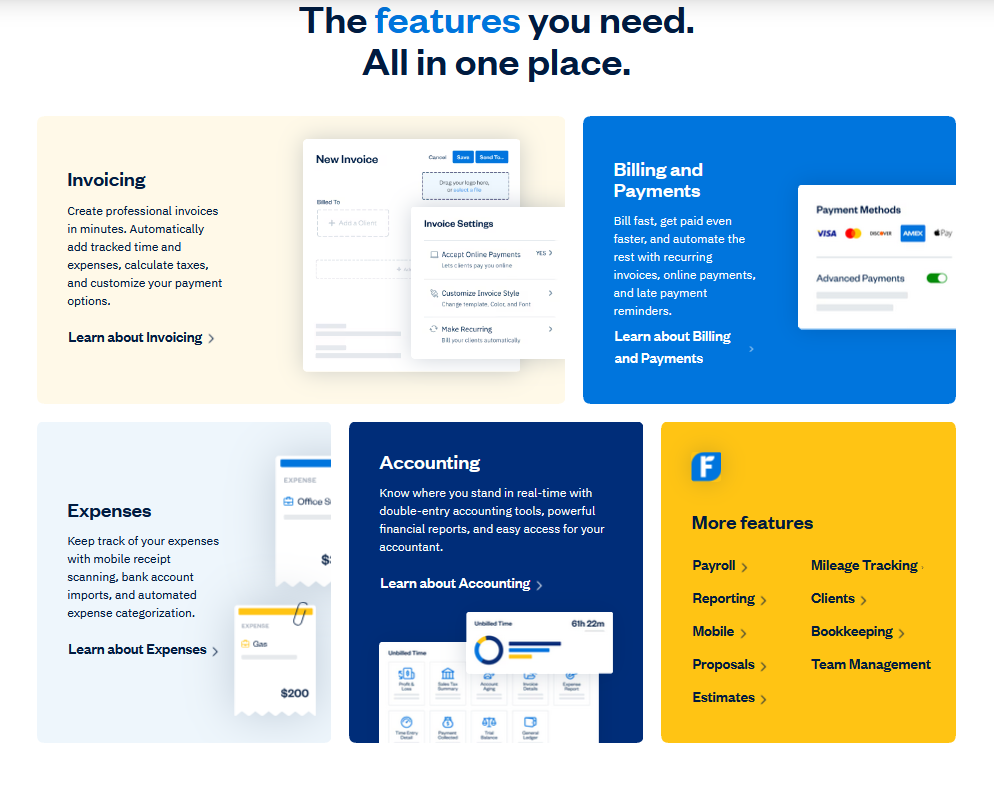
Key FreshBooks Features
The platform offers a broad range of tools, but the most important ones include:
- Invoicing
- Online payments
- Expense tracking
- Time tracking
- Accounting
- Financial reporting
- Estimates
- Proposals
- Project management
- Client management
- Mileage tracking
- Bookkeeping
- Payroll options
- Team management
- Mobile apps
- Integrations
FreshBooks says its platform includes more than 100 integrations and automation options, helping businesses connect their accounting workflows with other applications.
The exact features available to you can depend on the plan and your location.
FreshBooks Pricing Plans in 2026
Pricing is one of the most important things to consider before choosing accounting software.
FreshBooks currently lists four main plans:
Lite, Plus, Premium, and Select. The company also notes that pricing can vary depending on currency and region.
Here is a simplified overview of the currently displayed U.S. pricing:
| Plan |
Displayed price* |
Best suited for |
| Lite |
$23/month |
Very small businesses and freelancers |
| Plus |
$43/month |
Growing businesses |
| Premium |
$70/month |
Businesses with larger client lists |
| Select |
Custom |
Larger or more specialized businesses |
*FreshBooks is currently displaying a limited-time promotional discount, so the promotional prices should not be confused with the standard rates.

FreshBooks Lite
The Lite plan is designed for smaller operations and allows invoicing for up to five clients.
It includes features such as expense tracking, estimates, online payments, and tax-time reports.
This may be enough for a freelancer who has a small number of recurring clients and mainly needs professional invoicing and basic financial organization.
FreshBooks Plus
The Plus plan increases the invoice client limit to 50 and adds capabilities such as proposals, retainers, receipt scanning, financial reports, and accountant access.
For many growing freelancers and small businesses, this is likely to be the more practical middle-ground option.
FreshBooks Premium
Premium is designed for businesses that need to invoice an unlimited number of clients.
It also includes features such as project profitability, more advanced receipt scanning, customizable email templates, financial reports, and other tools aimed at growing businesses.
FreshBooks Select
Select is intended for businesses with more specific or advanced requirements.
FreshBooks lists features including customized email templates, removal of FreshBooks branding, dedicated phone support, Easy Switch data importing, lower payment transaction rates, and two team member accounts included at no extra charge.
Because Select is a custom plan, businesses need to contact FreshBooks for pricing.
Additional Costs to Consider
Your subscription may not be the only cost.
FreshBooks currently lists optional add-ons such as additional team members, Advanced Payments, and FreshBooks Payroll. The pricing displayed on its U.S. pricing page includes $11/month per additional team member, $20/month for Advanced Payments, and payroll starting at $40/month plus $6/month per user.
Payment processing fees and other charges may also apply depending on the payment method and service you use, so it's worth checking the current pricing details before subscribing.
Who Should Use FreshBooks?
FreshBooks is particularly appealing to businesses that need to combine invoicing and financial administration without building complicated accounting workflows from scratch.
It can be a good fit for:
- Freelancers
- Consultants
- Coaches
- Web designers and developers
- Marketing professionals
- Photographers
- Creative agencies
- Contractors
- Small service-based businesses
- Solopreneurs
- Businesses working with accountants
The platform itself specifically highlights freelancers, solopreneurs, and businesses with employees among its target audiences.
If your business mainly needs simple invoicing and payment collection, FreshBooks may also provide more functionality than you currently need. However, that additional functionality can become valuable as your business grows.
What Are the Main Benefits of FreshBooks?
The biggest benefit is convenience.
Instead of spending hours creating invoices, calculating billable time, organizing receipts, and manually monitoring outstanding payments, you can automate or centralize many of these processes.
Saves Administrative Time
Automation can reduce repetitive bookkeeping and billing tasks.
Makes Businesses Look More Professional
Professional invoices and payment options can create a better experience for clients.
Improves Financial Visibility
Financial reports can give you a clearer picture of revenue, expenses, profitability, and other business metrics.
Supports Remote Access
FreshBooks is cloud-based and can be accessed through computers and mobile devices, making it practical for people who work from different locations.
Makes Accountant Collaboration Easier
You can give your accountant access to relevant financial information rather than constantly sending spreadsheets and documents back and forth.
Are There Any Downsides?
FreshBooks isn't necessarily the perfect accounting platform for every business.
The biggest consideration is that pricing and available features depend on the plan you choose. Businesses with larger teams or more advanced accounting requirements may need a higher-tier plan or additional services.
Client limits on the lower-tier plans are another consideration. For example, the current Lite plan is limited to five clients for invoicing, while Plus allows up to 50 and Premium supports unlimited clients.
You should also consider whether FreshBooks supports the specific tax, payment, payroll, and accounting requirements of your country before committing to a subscription.
How to Get Started With FreshBooks
Getting started is relatively straightforward.
Step 1: Create Your Account
Go to the FreshBooks website and choose the option to start a trial or purchase a plan.
FreshBooks currently offers a trial, and its support documentation says you can try almost all of its features before committing to a plan.
Step 2: Verify Your Email
After registering, verify your account using the verification email FreshBooks sends you.
Step 3: Provide Your Business Information
FreshBooks will ask questions about your business during the initial setup process.
This information helps configure your account according to how you operate.
Step 4: Add Your Clients
Add the customers or clients you regularly work with.
Make sure names, email addresses, billing information, and other relevant details are accurate.
Step 5: Connect Your Financial Accounts
Where supported and appropriate, connect your bank accounts or other financial sources so you can streamline expense tracking and financial workflows.
FreshBooks provides automated bank-import and reconciliation capabilities as part of its accounting functionality.
Step 6: Customize Your Invoices
Add your business details, logo, payment information, and preferred invoice settings.
A professional invoice should make it immediately clear who is being billed, what they're paying for, how much they owe, and how they can pay.
Step 7: Start Tracking Expenses and Time
Begin recording business expenses and billable hours from the start.
Don't wait until the end of the month to reconstruct your financial activity from memory.
Step 8: Explore Reports
Once you've accumulated some financial data, explore FreshBooks' reporting tools.
This can help you understand how your business is performing and identify areas where costs may be getting out of control.
FreshBooks' official getting-started guide also walks users through account setup, data importing, account settings, online payments, and plan-specific features.
Is FreshBooks Worth It?
For the right user, FreshBooks can be worth considering.
If you're a freelancer or small-business owner who wants an easier way to manage invoices, payments, expenses, time tracking, and accounting in one place, its combination of features can save considerable administrative effort.
The bigger question isn't whether FreshBooks has enough features. It does.
The question is whether those features match
your business size, workflow, budget, and accounting requirements.
A freelancer with five clients doesn't necessarily need the same plan as an agency managing dozens of customers and multiple team members. That's why it's important to compare the plans and identify the features you'll actually use rather than automatically choosing the most expensive option.
Frequently Asked Questions About FreshBooks
What is FreshBooks mainly used for?
FreshBooks is mainly used for invoicing, billing, payments, expense tracking, time tracking, accounting, financial reporting, and managing clients and projects.
Is FreshBooks an accounting software?
Yes. FreshBooks provides accounting functionality in addition to its invoicing and billing tools. It offers accounting reports, double-entry accounting capabilities, bank-related workflows, and accountant collaboration features.
Is FreshBooks good for freelancers?
Yes. Freelancers are one of FreshBooks' key target audiences. The platform can be particularly useful for freelancers who need to track billable time, send invoices, collect payments, organize expenses, and manage clients.
Can FreshBooks track expenses?
Yes. FreshBooks allows users to track expenses, import bank transactions, and use receipt-scanning and categorization features, depending on the plan and available functionality.
Can FreshBooks create invoices?
Yes. Creating and sending professional invoices is one of FreshBooks' core functions. Users can also automate recurring invoices and payment reminders.
Does FreshBooks have a free plan?
FreshBooks offers a trial rather than relying solely on a permanently free plan. Its current support documentation says users can try almost all features during the trial before committing to a paid plan.
Can I use FreshBooks on my phone?
Yes. FreshBooks can be accessed through mobile apps as well as computers.
Can my accountant use FreshBooks?
Yes. FreshBooks allows businesses to give accountants access to financial information, making collaboration easier.
Final Verdict: What Is FreshBooks Used For?
So,
what is FreshBooks used for?
In simple terms, FreshBooks is used to make the financial side of running a small business easier to manage. From creating invoices and accepting payments to tracking expenses, recording billable hours, managing projects, and reviewing financial reports, it brings many essential business-finance activities into one platform.
Its strongest appeal is its focus on usability. You don't have to be an accounting expert to understand why an invoice is overdue, how much a client owes, or how much your business spent last month.
For freelancers, consultants, and small service-based businesses, that simplicity can be a major advantage.
However, you should choose your plan carefully. Consider your number of clients, required accounting features, team size, payment needs, and budget before subscribing.
Ready to Try FreshBooks?
If you're tired of managing invoices, expenses, payments, and financial records manually, FreshBooks is worth exploring. You can start with its trial, test the features that matter to your business, and decide whether it fits your workflow before committing to a paid plan.
Take the next step and see whether FreshBooks can simplify your business finances.
Try FreshBooks Free